

Introduction
Both AI workloads and gaming workloads push GPUs to their limits — but they don’t stress them in the same way.
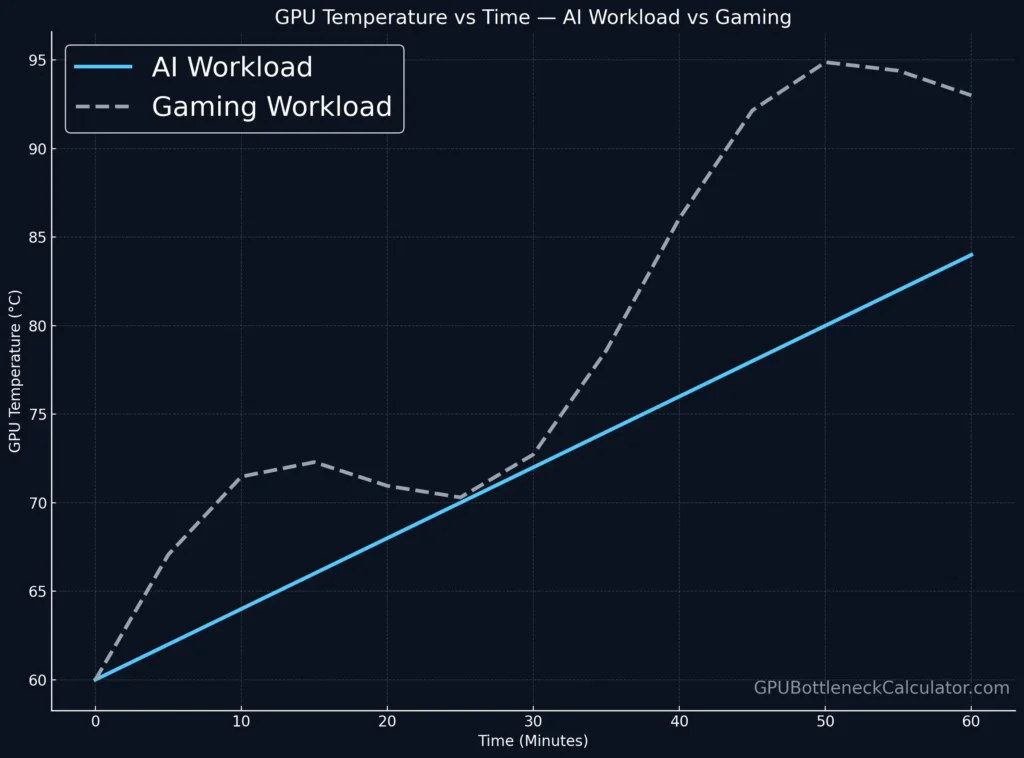
In our lab at GPUBottleneckCalculator.com, we’ve observed that GPUs running AI inference or deep-learning training experience sustained, predictable thermal rise, while gaming loads produce spiky, transient heat cycles.
This difference in thermal throttling behavior explains why an RTX 4090 might train a model efficiently at 85 °C for hours yet drop frames at 70 °C in a graphically intense game.
Let’s break down why — and how you can manage thermals across both use cases.
What Is Thermal Throttling?
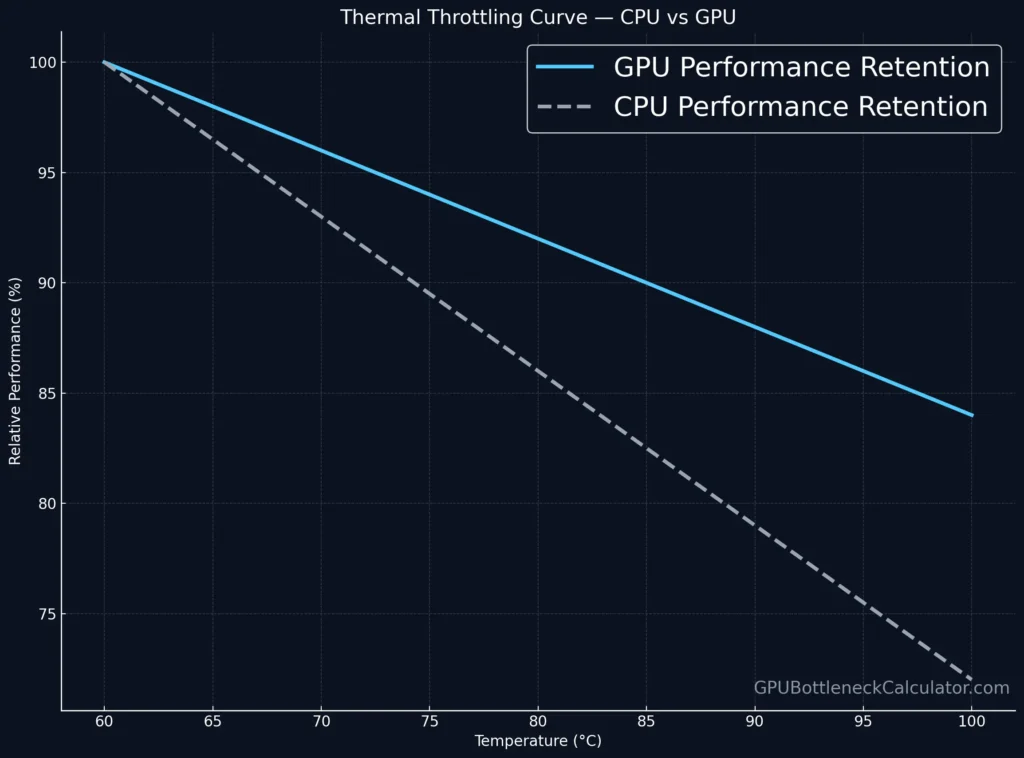
Thermal throttling occurs when a CPU or GPU automatically reduces its clock speed to prevent overheating once it nears its thermal limit. For most modern GPUs, the GPU temperature range where throttling begins is around 83–87 °C; for CPUs, it’s typically 95–100 °C.
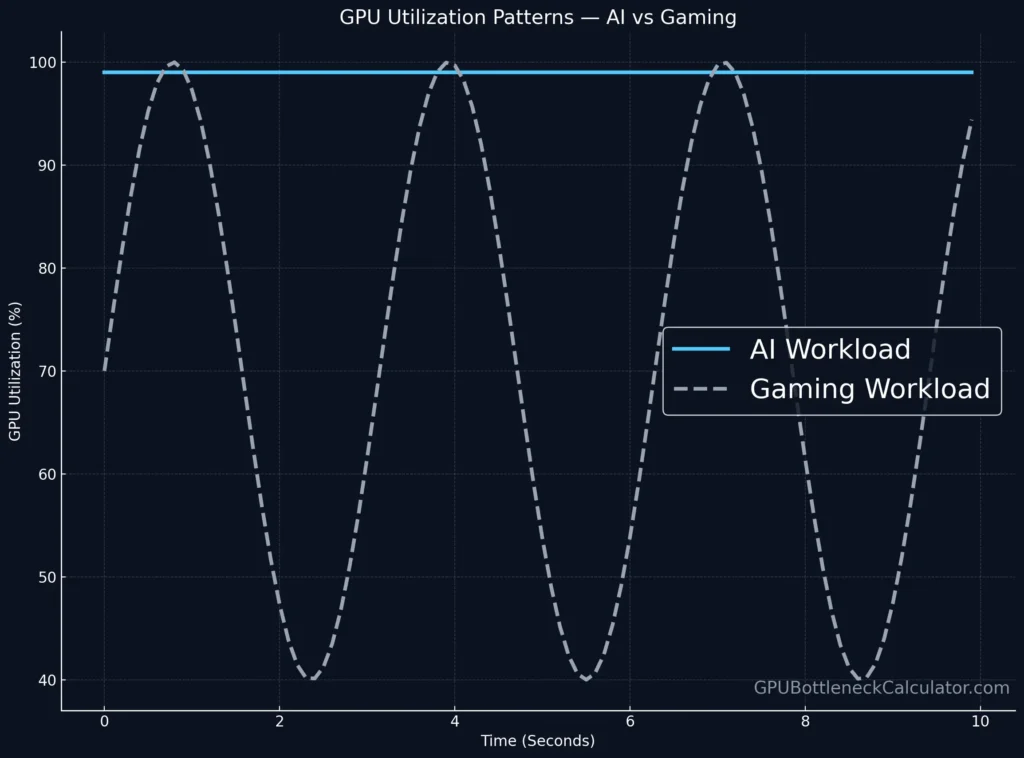
Gaming workloads trigger short-term bursts of power draw, while AI workloads sustain constant utilization of tensor cores and VRAM bandwidth — creating different thermal curves.
| Component | Typical Throttle Temp | Behavior Type |
|---|---|---|
| GPU (Gaming) | 83–86 °C | Bursty heat cycles |
| GPU (AI) | 85–88 °C | Sustained plateau |
| CPU | 95–100 °C | Short throttling windows |
🧠 Thermal throttling in gaming affects FPS consistency; in AI workloads, it impacts sustained compute efficiency and model-training speed.
How AI Workloads Generate Heat Differently
Unlike gaming, AI workloads (like neural-network inference or model training) maintain 100 % GPU utilization across tensor, RT, and CUDA cores for extended periods.
Key Differences
- Sustained Load: AI jobs continuously occupy GPU memory, compute cores, and cache.
- Consistent Power Draw: Power remains close to the card’s TDP, often 300 W + for high-end GPUs.
- Minimal Idle Phases: No “frame gaps,” unlike games with variable rendering scenes.
Example
An RTX 4090 running Stable Diffusion or Llama 3 inference stays at 100 % load for hours, producing uniform heat.
This uniformity results in a smoother temperature throttling curve, but a higher average temperature overall.
AI workloads prefer predictable sustained thermals; gaming stresses dynamic cooling reactions.
Thermal Throttling in Gaming Workloads
Gaming workloads are burst-heavy — GPU and CPU usage spike when rendering complex frames or loading assets.
What Happens
- GPU utilization fluctuates between 60 % and 99 %.
- Rapid spikes in voltage and temperature can cause micro-throttling even below 80 °C.
- The fan curve response becomes critical for keeping temps stable.
Impact on Performance
In testing, titles like Cyberpunk 2077 or Alan Wake 2 produced visible FPS dips every time the GPU reached 82–84 °C.
While thermal throttling in AI workloads occurs gradually, thermal throttling in gaming happens in milliseconds — directly affecting frame-time stability and smoothness.
Power Draw and Sustained Performance

| Metric | AI Workload (Training) | Gaming Workload (4K Ultra) |
|---|---|---|
| GPU Utilization | 99–100 % constant | 60–99 % variable |
| Average Power | ~TDP (300–400 W) | Spikes 250–420 W |
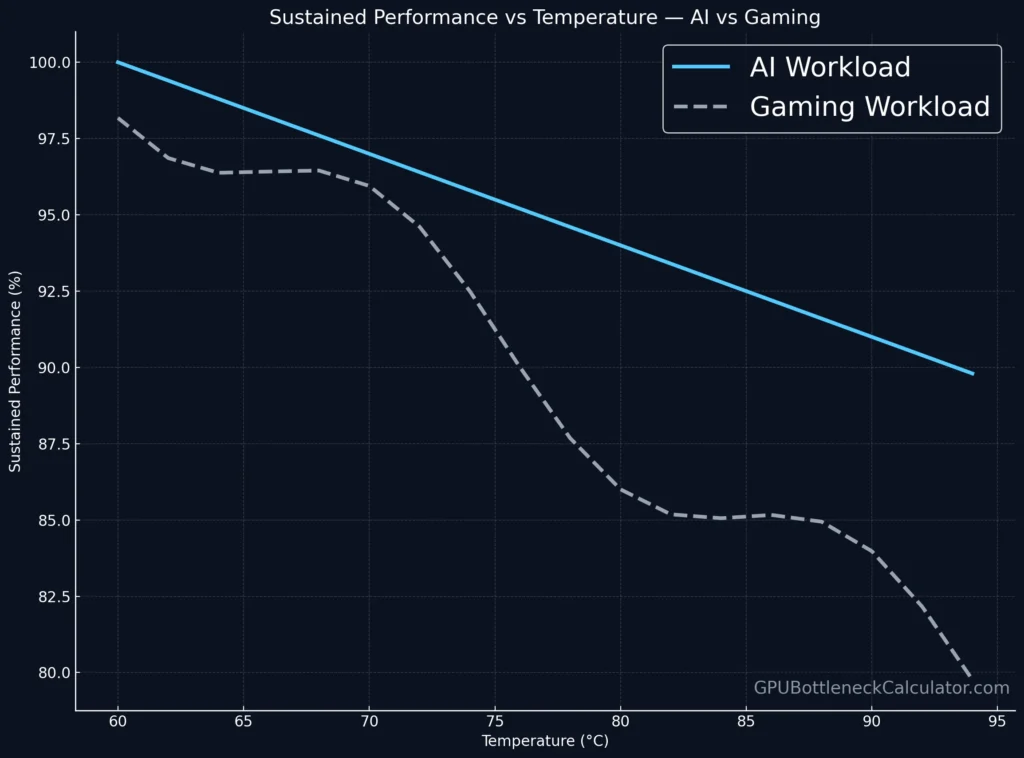
| Clock Behavior | Slow taper after saturation | Rapid up/down cycles |
| Thermal Pattern | Stable plateau | Oscillating peaks |
| Performance Drop | Gradual (2–5 %) | Sudden (FPS stutter) |
Sustained GPU performance depends on your cooling system’s ability to hold temps below 85 °C.
For AI workloads, long-term heat is the challenge; for gaming, short-term spikes are.
Why AI GPUs Handle Heat Better
AI-optimized GPUs — like NVIDIA’s RTX A6000, H100, or Apple’s M-series chips — are designed for long-duration workloads with efficient heat distribution and lower core density per watt.
- AI GPU temperature is regulated via larger vapor chambers and slower fan RPM curves.
- Gaming GPUs prioritize acoustics and boost clocks, causing more aggressive thermal swings.
- Data-center GPUs can sustain 300 W+ loads continuously thanks to redundant liquid or passive rack cooling.
Managing Thermal Headroom for AI vs Gaming
- For AI workloads:
- Use an open-air or server-style setup.
- Keep ambient room temps below 26 °C.
- Monitor with
nvidia-smifor sustained thermal averages. - Consider undervolting for stability.
- For gaming workloads:
- Enable a more aggressive fan curve (like 60 % RPM @ 70 °C).
- Maintain positive case pressure for airflow.
- Apply fresh thermal paste every 18 months.
Case Study: RTX 4090 AI vs Gaming Throttling Curve
| Condition | Max Temp | Avg Clock | Throttling Observed |
|---|---|---|---|
| AI Workload (Tensor Load) | 87 °C | 2.40 GHz | Minor after 30 min |
| Gaming (4K Ultra) | 83 °C | 2.61 GHz | Frequent micro-drops |
The same GPU shows different thermal throttling signatures depending on load type — sustained vs bursty — even under identical cooling.
Real-World Insight: CPU Thermal Throttling in AI Inference
When running large models (like GPTQ or LoRA inference), the CPU often coordinates memory shuffling and disk I/O.
CPU thermal throttling can appear sooner in smaller cases or laptops due to poor VRM airflow — limiting AI throughput.
Optimization Summary
| Use Case | Cooling Focus | Throttling Trigger | Mitigation |
|---|---|---|---|
| AI Workloads | Sustained dissipation | Long heat soak | Liquid or industrial fans |
| Gaming | Rapid heat spikes | Short-term peaks | Aggressive fan curve |
| Mixed (Creator) | Both sustained + burst | Hybrid | Adaptive cooling software |
Verdict
Thermal throttling behaves fundamentally differently in AI workloads versus gaming.
AI loads generate steady, predictable thermals that test long-term cooling efficiency.
Gaming pushes your GPU into rapidly fluctuating power and heat cycles that test reaction time.
For gamers, a tuned fan curve and airflow optimization prevent FPS stutters.
For AI users, sustained cooling and undervolting maintain model stability and hardware lifespan.
Both worlds meet at one truth: Temperature is the real bottleneck.
Frequently Asked Questions
1. Can I run AI workloads on my GPU?
Yes. Most modern GPUs with CUDA or Metal support can handle AI workloads such as model training or inference. Ensure sufficient VRAM and cooling to avoid GPU thermal throttling.
2. Best GPU-based Mac for AI workloads
Apple’s M3 Max MacBook Pro and Mac Studio (M2 Ultra) deliver strong AI workload performance with efficient cooling. Their unified memory architecture prevents thermal bottlenecks during sustained tasks.
3. AI data storage vendors for petabyte-scale AI workloads
Large-scale AI workloads rely on distributed storage like Pure Storage FlashBlade, Dell EMC Isilon, and NetApp ONTAP AI. These systems sustain multi-petabyte throughput without throttling I/O speeds.
4. Best cloud for handling AI workloads
NVIDIA DGX Cloud, AWS P4d instances, and Google Cloud TPU v5e offer optimal scalability for AI workloads, featuring high thermal efficiency and automated cooling at rack level.
5. Will AI replace gaming?
No. AI will augment gaming — from smarter NPCs to adaptive rendering — but not replace it. Gaming remains an interactive experience driven by player engagement, not automation.
6. How much RAM for AI workloads?
At least 32 GB system RAM is recommended for basic AI workloads. Large-scale model training may require 64–128 GB or more, depending on dataset size and GPU VRAM availability.
7. What are the disadvantages of AI in gaming?
AI integration can increase CPU/GPU load, risk thermal throttling, and reduce optimization flexibility. It may also raise power consumption and require frequent driver updates.
8. How is AI impacting gaming?
AI enhances gaming through upscaling (DLSS, FSR), realistic physics, and intelligent opponents — but it also increases GPU temperature and overall system demand.