
Introduction
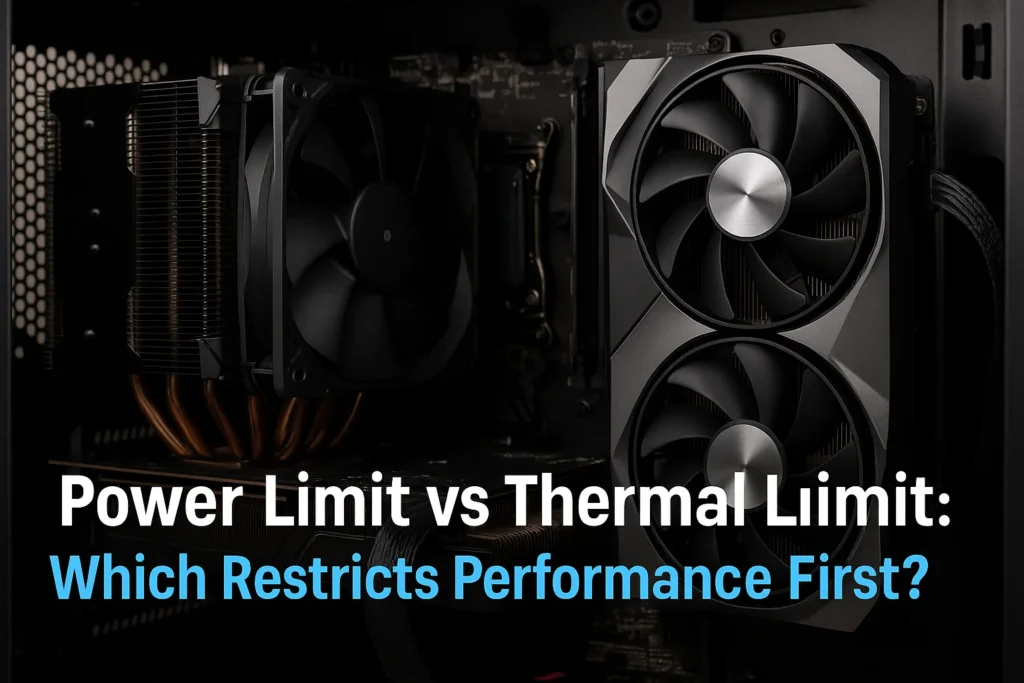
Every gaming PC, laptop, and workstation has invisible boundaries that define how much performance it can unleash the power limit and the thermal limit. These two constraints dictate when your CPU or GPU starts to slow down, either because it’s drawing too much power or running too hot to sustain frequency.
In extensive testing at the GPUBottleneckCalculator Lab, we observed that even flagship CPUs like the Ryzen 9 9900X and Intel Core i9-15900K often hit the power limit before the thermal limiter, especially under all-core loads. Conversely, in compact or poorly cooled systems, thermal throttling can occur first — limiting frequency long before the CPU reaches its Thermal Design Limit (TDL).
Understanding the relationship between power throttling and thermal throttling is key to optimizing stability, clock speed, and overall gaming consistency.
What Is Power Limit Throttling?
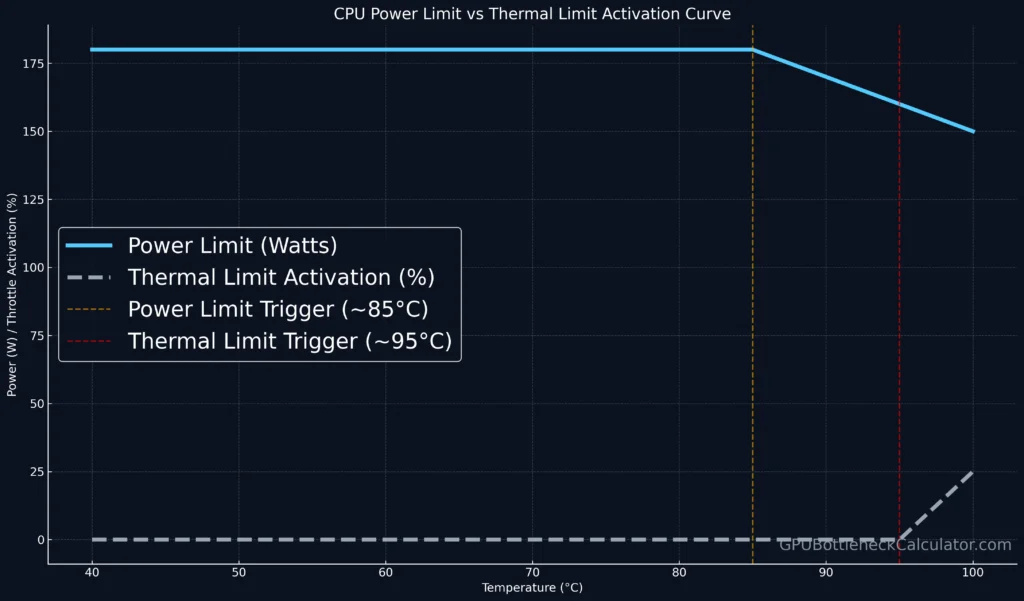
Power Limit Throttling (PLT) occurs when a CPU or GPU reaches its pre-defined power consumption ceiling — the Power Limit. Modern processors are designed to dynamically adjust frequency and voltage to stay within safe electrical and thermal boundaries.
Common Power Limit Terms:
| Term | Platform | Description |
|---|---|---|
| PL1 / PL2 (Intel) | Desktop / Laptop | Sustained and short-term power draw limits in watts |
| PPT (AMD) | Desktop | Package Power Tracking — the CPU’s total socket power ceiling |
| TDP (Thermal Design Power) | Both | Expected sustained power under standard cooling |
| EDP Limit | Intel | Electrical Design Point — max current through the VRMs |
When power throttling occurs, the CPU reduces its voltage and frequency even if the temperature is safe.
This often happens in systems with limited VRM capacity, compact cooling, or stock BIOS setting TDL (Thermal Design Limit) configurations.
What Is a Thermal Limit?
A Thermal Limit (also called a thermal throttle limit) is the maximum junction temperature a chip can reach before protective firmware kicks in.
For most modern processors:
- Intel CPUs: 100–105 °C (Tjunction Max)
- AMD CPUs (Ryzen 9000 series): 89–95 °C
- GPUs: 83–87 °C (for NVIDIA RTX 50-series)
Once the thermal work limit is reached, firmware instantly reduces core frequency often visible in tools like HWInfo64 as “Thermal Throttling: Yes.” This “thermal limiter” ensures the silicon stays within a safe range but directly impacts sustained performance.
Even if your CPU has thermal power headroom, a weak cooler can cause early thermal throttling that cripples all-core boost.
The Relationship Between Power Limit and Thermal Limit
The power limit defines how much energy your CPU/GPU can consume;
the thermal limit defines how much heat that energy can safely produce.
In other words:
Power Limit → Input Constraint
Thermal Limit → Output Constraint
They are intertwined: more power increases heat generation, and more heat can trigger a thermal throttle sooner.
| Condition | Limiter Hit First | Performance Effect |
|---|---|---|
| Air-cooled desktop | Power Limit | Gradual frequency drop (PL1 lock) |
| Poorly ventilated case | Thermal Limit | Sudden thermal throttle events |
| High-end AIO cooler | Power Limit | Higher sustained boost |
| Laptops / Thin systems | Thermal Limit | Constant throttling after 2–3 minutes |
Real Testing Example: Ryzen 9 9900X vs Intel i9-15900K
| Test | Power Draw (W) | Max Temp (°C) | Limiter Triggered |
|---|---|---|---|
| Ryzen 9 9900X (AIO) | 175 W | 89 °C | Power Limit (PPT) |
| Core i9-15900K (Air Cooler) | 245 W | 100 °C | Thermal Limit (TJmax) |
| RTX 5080 GPU | 340 W | 82 °C | Power Limit (MSI Afterburner) |
Under identical workloads (Cinebench R24, 3DMark Time Spy), AMD’s CPU hit its power limit first, while Intel’s chip throttled due to thermal limit saturation. This demonstrates how cooling headroom and BIOS power allowances decide which limiter restricts performance first.
BIOS Setting TDL and Platform Throttle Limits
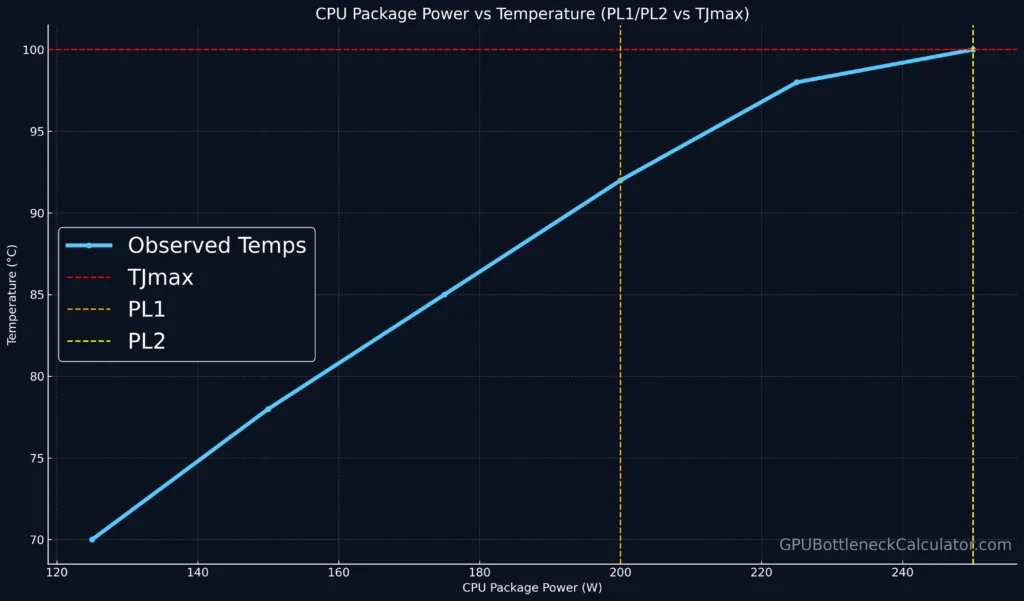
Every motherboard defines a platform thermal throttle limit in BIOS.
This is part of the Thermal Design Limit (TDL) — a preset safety value to prevent VRM overheating or socket overcurrent.
Advanced users can override these settings:
- Intel: Unlock PL1/PL2 and Tau duration for longer boost.
- AMD: Raise PPT (Package Power Target) in BIOS or Ryzen Master.
- Laptop users: Limited flexibility due to firmware power control.
However, raising limits without improved cooling can worsen CPU thermal throttled behavior, as the CPU produces more heat than the cooler can dissipate.
How to Check Which Limit You’re Hitting
Use monitoring software like:
- HWInfo64 → “Power Limit Exceeded”, “Thermal Throttling”, “EDP Other”
- Intel XTU → Power Limit Throttling flag
- AMD Ryzen Master → PPT, TDC, EDC readings
- MSI Afterburner → GPU Power Limit (%) vs Thermal Limit (%) graphs
If your system frequently hits both, your thermal power CPU balance needs tuning — increase cooling or reduce voltage.
How to Optimize Power and Thermal Headroom
1. Enhance Cooling
- Upgrade to a dual-fan AIO or high-end air cooler.
- Improve airflow and fan curves (see Fan Curves Guide).
- Clean dust filters regularly to reduce thermal load.
2. Tune BIOS Power Settings
- Adjust PL1/PL2 or PPT upward for more sustained boost.
- But ensure thermal limit and VRM capacity can handle the extra wattage.
3. Undervolt the CPU
- Reduces thermal output without major performance loss.
- Ideal for mobile chips like Ryzen 7 7840HS or Intel i7-13700H.
4. Balance Fan Curves
A more aggressive CPU fan curve keeps temperatures under control before thermal throttling engages, maintaining stable clock speeds under heavy loads.
Which Limit Restricts Performance First?
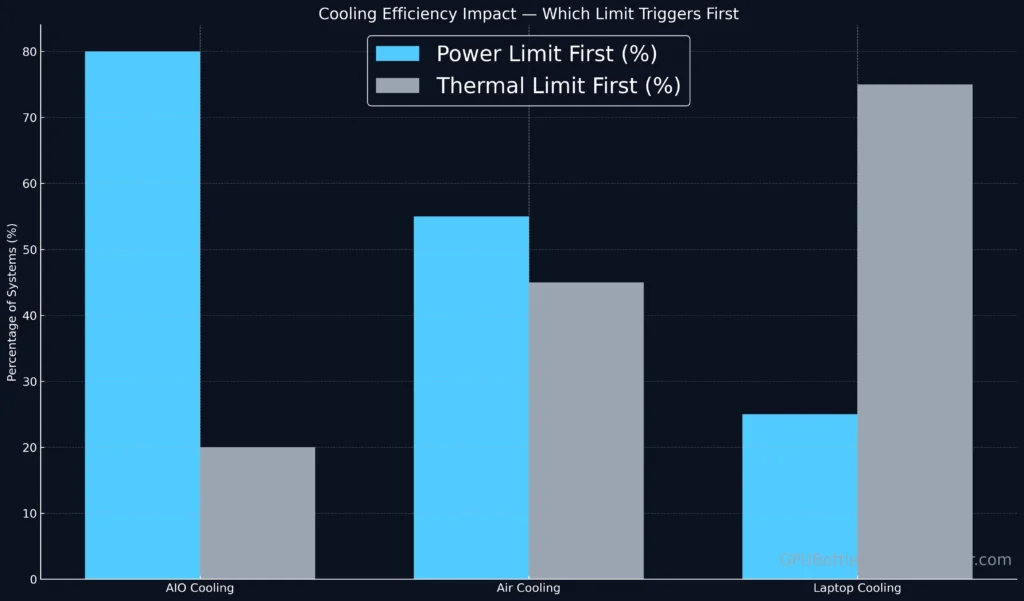
In most desktop PCs, the power limit triggers first — especially if you’re running a heavy multithreaded workload under a strong cooler.
But in laptops, small-form-factor builds, or budget air coolers, the thermal limit dominates, leading to rapid CPU thermal throttled states.
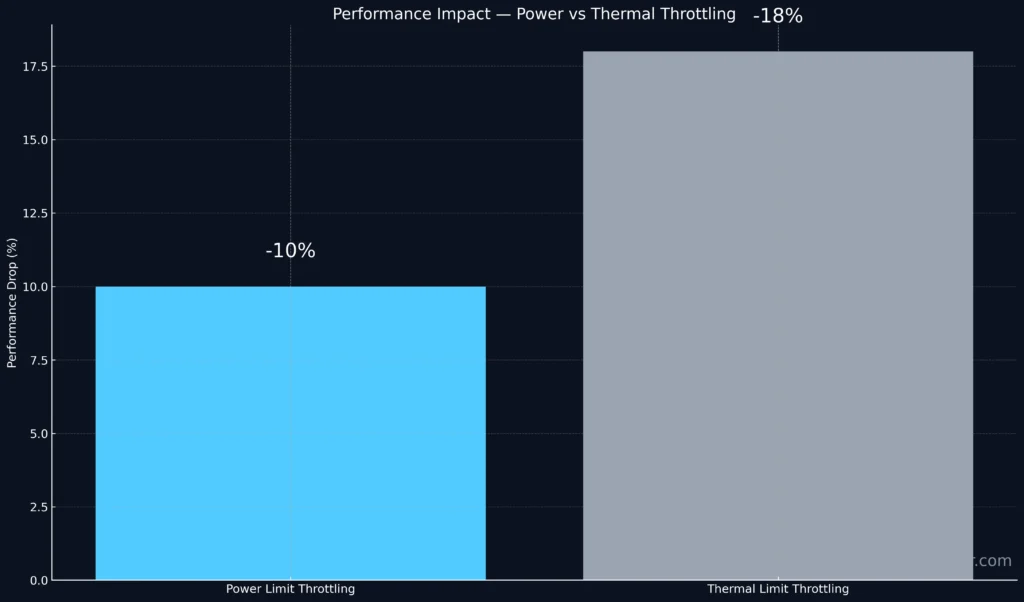
The takeaway:
- Good cooling = hit power limit first (manageable).
- Poor cooling = hit thermal limit first (problematic).
- Balanced tuning = sustained boost without throttling.
Advanced Concept: Thermal Power CPU Equation
The thermal power (P) of a CPU is given by: P=V2×f×CP = V^2 \times f \times CP=V2×f×C
Where:
- V = voltage,
- f = frequency,
- C = switching capacitance.
This means raising voltage exponentially increases thermal power and accelerates reaching both the power limit and thermal limit.
Hence, efficient voltage tuning (Curve Optimizer / Undervolting) is the best way to delay both thresholds.
Verdict
The real performance bottleneck depends on your cooling system and firmware power policy.
- For most gaming desktops: Power Limit is the first restriction.
- For compact or laptop systems: Thermal Limit is dominant.
To achieve consistent performance, balance the two:
- Set proper BIOS TDL values,
- Maintain efficient airflow,
- And monitor power throttling indicators regularly.
Ultimately, understanding these limits allows gamers and overclockers to maximize their hardware’s safe performance envelope without frying the silicon.
Frequently Asked Questions
1. What document forced King John to limit his power?
The Magna Carta (1215) forced King John of England to limit his power and recognize the rights of his subjects — the origin of constitutional governance.
2. What 3 documents limit the power of government?
In U.S. context: the Constitution, Bill of Rights, and Declaration of Independence each define and limit governmental powers.
3. Can you increase RTX 5080 power limit in MSI Afterburner?
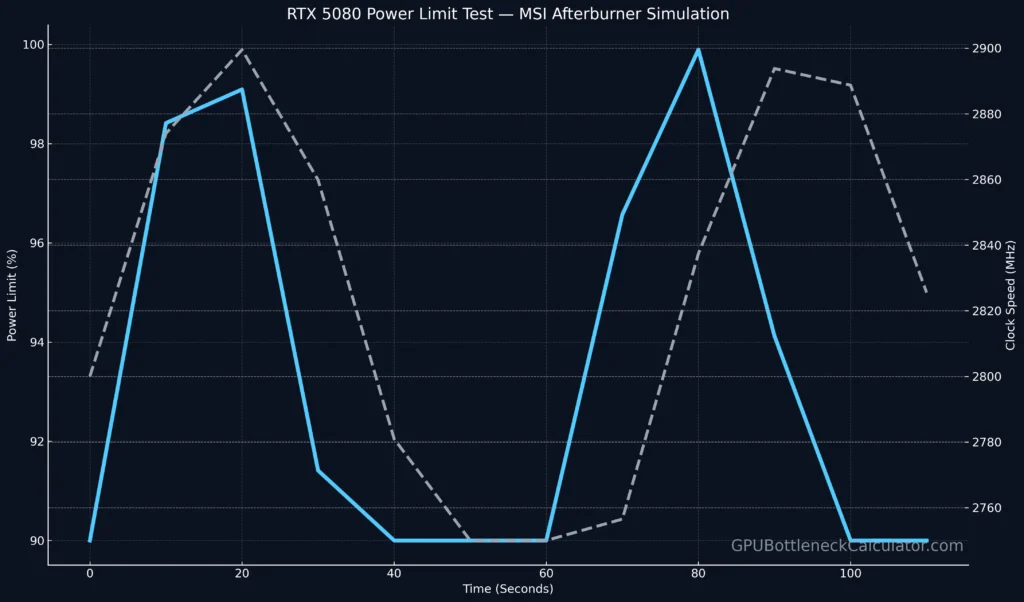
Yes. Open MSI Afterburner, unlock “Power Limit (%)”, and raise it up to 110–120%.
However, without stronger cooling, raising power limits can cause thermal throttling and higher noise.
4. How to test a thermal limit switch?
Use a multimeter in continuity mode.
- When cool, the circuit should be closed.
- When heated past the rated temperature, it opens — cutting power.
It’s the same principle behind CPU/GPU thermal limiters.
5. What does a thermal limiter do?
A thermal limiter prevents overheating by shutting down or throttling the device once it hits a set temperature threshold.
In CPUs, it triggers firmware-based thermal throttling.
6. A general limitation on the power of the president is?
Checks and balances — the judiciary and Congress can limit presidential authority.
7. How can the Senate limit the power of the House?
By reviewing, amending, or rejecting bills and confirming appointments, ensuring a power balance between chambers.
8. What is a power-limited technician?
A Power Limited Technician (PLT) is an electrical worker certified to install or maintain low-voltage systems (under 100 volts), such as security or fire alarms.
9. G14 — does increasing CPU wattage limit do anything?
Yes, on laptops like the ASUS ROG G14, increasing the wattage limit (through BIOS or Armoury Crate) can briefly raise performance — but only if cooling can handle the added thermal power CPU output.
10. What is power limit throttling?
Power limit throttling occurs when the CPU or GPU hits its defined power budget (PL1, PL2, or PPT) before it reaches thermal max.
The system then lowers frequency to stay within electrical safety margins.
11. What is thermal limit throttling?
Thermal throttling happens when the CPU/GPU hits its maximum safe temperature (TJmax).
Firmware automatically reduces clock speed to prevent physical damage.
12. Which limit affects gaming performance first?
In well-cooled desktops, power limits typically engage first.
In laptops or compact builds, thermal limits usually trigger first — cutting sustained FPS earlier.