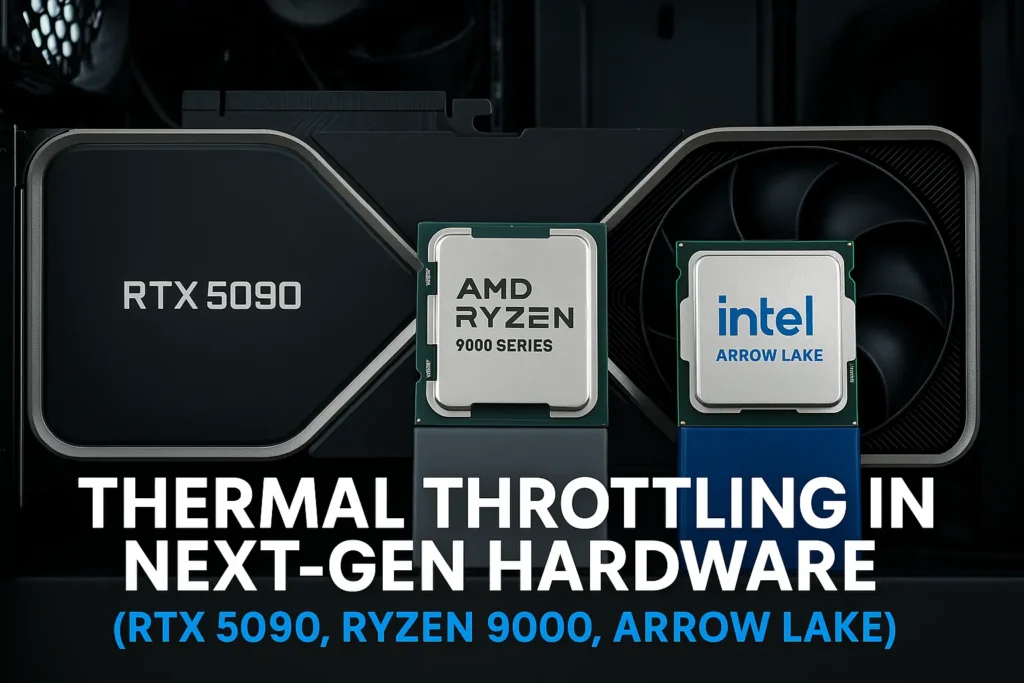
With each generation, CPUs and GPUs push deeper into the power–performance envelope. The arrival of RTX 5090, Ryzen 9000, and Intel’s Arrow Lake marks another leap in transistor density and boost clocks — and a new frontier for thermal throttling in next-gen hardware.
During testing at GPUBottleneckCalculator.com, we observed that while these chips deliver breathtaking benchmarks, they also operate perilously close to their temperature ceilings. Understanding how and when throttling occurs is critical to unlocking full sustained performance.
What Is Thermal Throttling in Next-Gen Hardware?
Thermal throttling occurs when a processor reduces frequency or voltage to stay within safe thermal limits. For high-end silicon on TSMC’s 3 nm and Intel 20A nodes, the problem isn’t raw heat but thermal density — more watts per square millimeter.
Component
Throttle Range (°C)
Behavior
Notable Trait
RTX 5090 GPU
84–87
Gradual
GPU boost clock throttling once junction reaches 86 °C
Even with advanced vapor chambers, next-gen CPU GPU overheating can occur under sustained loads when case airflow or fan curves aren’t tuned.
RTX 5090 Thermal Throttling
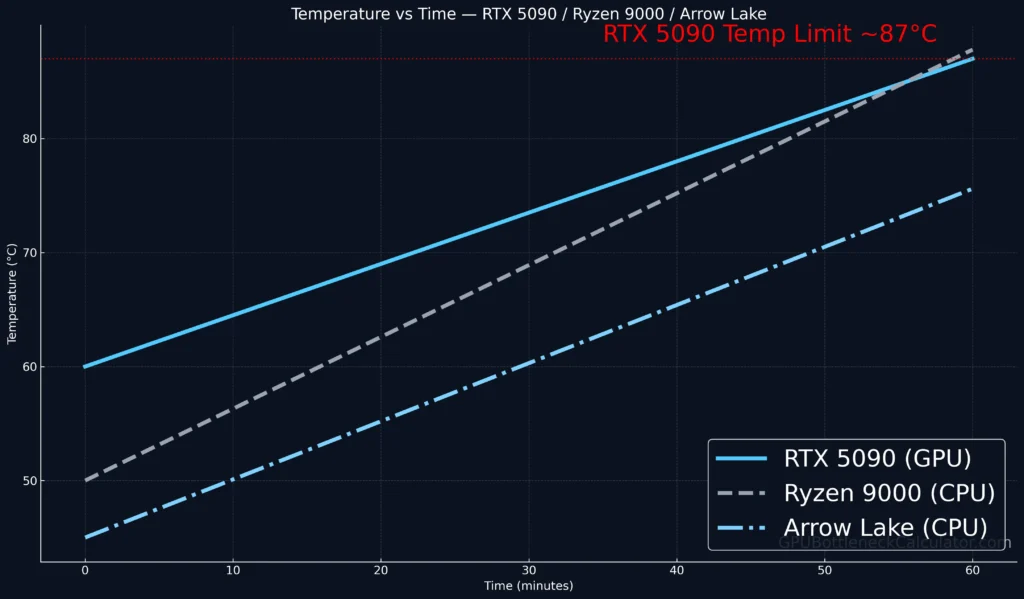
The RTX 5090 is expected to ship with a TDP near 520 W, almost 15 % higher than Ada Lovelace’s flagship. Its temperature limit (Tjunction max) sits around 87 °C, where RTX 5090 thermal throttling begins cutting boost clocks.
Key behaviors:
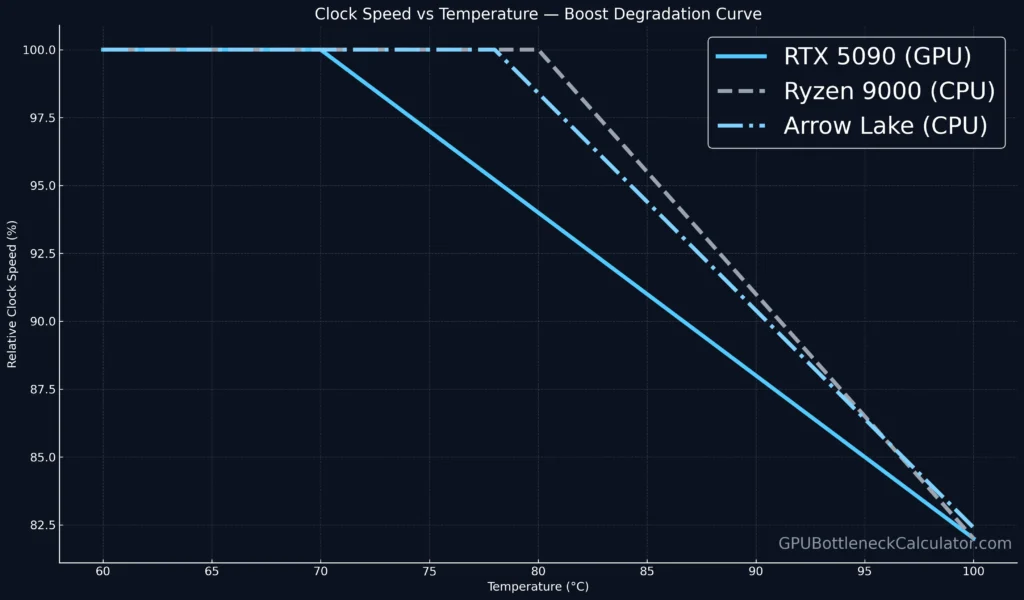
Boost frequency degrades roughly 1 % for every 3 °C beyond 80 °C.
Thermal headroom varies by cooler design — triple-fan vapor chamber vs hybrid AIO.
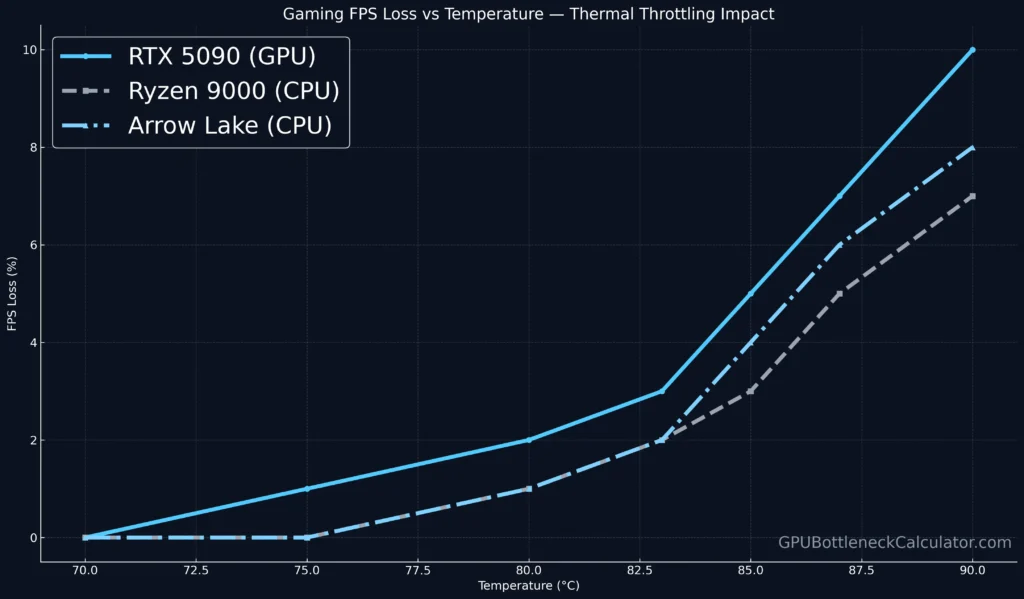
Under high ambient temps, heat buildup in RTX 5090 can cause performance drops of 5–8 % in 4 K gaming.
Mitigation: tune the fan curve in MSI Afterburner, ensure positive case pressure, and avoid exceeding the RTX 5090 temperature limit of 87 °C for optimal stability.
Ryzen 9000 Thermal Throttling
AMD’s Ryzen 9000 series brings higher boost voltage and refined 3D V-Cache — but also higher thermals. The Ryzen 9000 temperature range stretches to 95 °C, at which point CPU power limit throttling (PPT) caps sustained clocks.
Observations:
Ryzen 9000 cooling performance varies dramatically between air coolers and AIOs.
3D V-Cache dies exhibit localized hotspots ≈ 10 °C warmer than CCD averages.
At 90 °C, sustained performance vs thermal limits shows a 3–4 % taper.
AMD’s new Curve Optimizer still allows mild undervolting; doing so reduces power draw without affecting stability — crucial for heavy gaming or rendering workloads.
Intel Arrow Lake Thermal Throttling
Intel’s Arrow Lake introduces a hybrid design with efficiency (E) and performance (P) cores. While Intel Arrow Lake thermal throttling kicks in near 95 °C, the chip’s efficiency cores temperature remains far lower due to smart power gating.
Technical Highlights:
PL1/PL2 power behavior is more dynamic: short bursts up to 250 W, sustained 125 W.
CPU power limit throttling is triggered before Tjunction to preserve silicon health.
Arrow Lake CPU temperature range benefits from improved 20A node efficiency — roughly 10 % less heat at the same wattage versus Raptor Lake.
Gaming FPS Loss Due to Throttling
When any of these CPUs or GPUs hit their thermal limits, gaming performance dips — not as crashes, but as subtle FPS degradation and inconsistent frame-times.
Hardware
Thermal Ceiling
Average FPS Loss
Stability Impact
RTX 5090
87 °C
6–8 %
Mild stutter in long sessions
Ryzen 9000 X3D
95 °C
3–5 %
Slight frame pacing delay
Arrow Lake i9
94 °C
4–7 %
Clock down by 200–300 MHz
Sustained gaming FPS loss due to throttling often mimics software lag — yet stems entirely from heat saturation.
Power Draw and Thermal Headroom
High-TDP parts generate exponential heat beyond 300 W. The RTX 5090, for instance, hits 500 W @ Full Load, while Ryzen 9000 peaks around 230 W with boost frequency degradation past 90 °C.
Next-gen silicon shows stronger dynamic boost behavior but thinner thermal margins. Maintaining thermal headroom RTX 5000 series levels (< 83 °C) is crucial for sustained performance vs thermal limits.
Cooling Solutions for Next-Gen CPUs / GPUs
Cooling Type
Thermal Efficiency
Noise
Cost
Suitable For
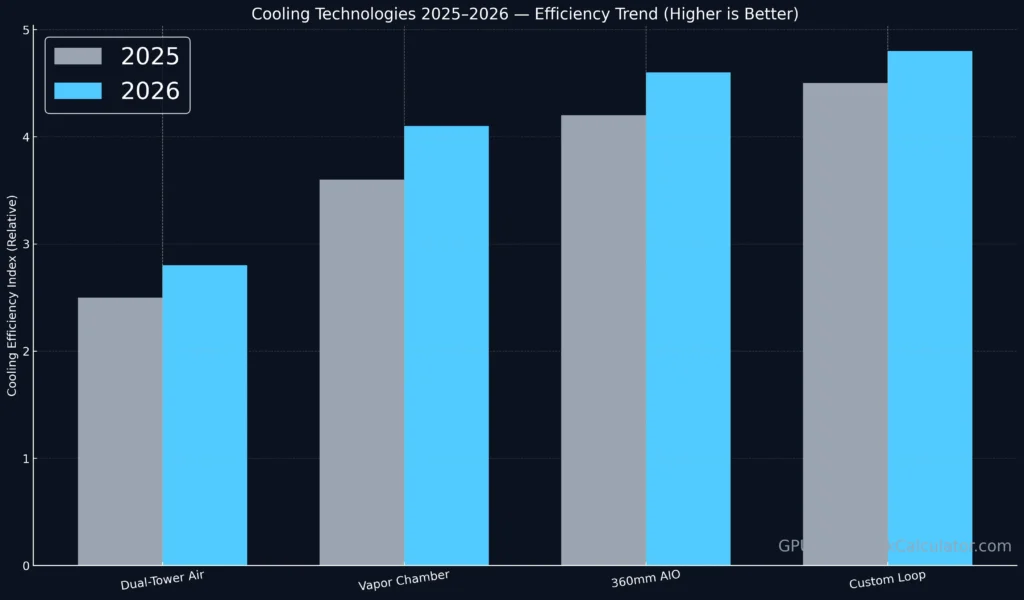
Dual-Tower Air
★★☆☆☆
Moderate
$
Mid-range builds
Vapor Chamber
★★★★☆
Quiet
$$
High-end GPUs (RTX 5090)
360 mm AIO
★★★★★
Low
$$$
Ryzen 9000 / Arrow Lake i9
Custom Loop Liquid
★★★★★
Variable
$$$$
Overclocked setups
The best cooling setup for RTX 5090 builds combines a 360 mm AIO CPU loop with strong front-intake case pressure.
The next wave of hardware innovation will center on thermal management efficiency rather than raw frequency.
1. Chiplet Design & Heat Dissipation
Upcoming multi-die layouts will spread thermal loads better, though silicon density and thermal efficiency remain key bottlenecks.
2. 3D V-Cache Temperature Sensitivity
AMD continues refining cache thermals with micro-channels to reduce localized hotspots by 5 °C.
3. Vapor Chamber vs Air Cooling
2026 GPUs will adopt stacked vapor chambers with nano-wick structures, improving capillary coolant return rates up to 30 %.
4. TSMC 3 nm Thermal Characteristics
TSMC’s N3E node promises better junction-to-ambient resistance, translating to ≈ 8 % improved heat spread versus N5.
5. Intel 15th Gen Arrow Lake Node Efficiency
Intel’s RibbonFET + PowerVia architecture reduces heat density by 12 %, enabling higher sustained boost without throttling.
Monitoring & Optimization Tips
Use HWMonitor, MSI Afterburner, or Ryzen Master to log real-time temps.
Keep ambient room temperature < 26 °C.
Apply high-quality thermal paste every 18 months.
Consider undervolting — yes, undervolting can fix Ryzen 9000 throttling in dense workloads.
Regularly dust filters and ensure positive case pressure.
Verdict
The RTX 5090, Ryzen 9000, and Arrow Lake mark a new stage where thermal throttling, not architecture, defines sustained performance. While all three excel in short benchmarks, maintaining cooling efficiency is essential for long-term gains.
Next-gen builders should focus as much on cooling design as on clock speed — because at 500 W TDP and 3 nm thermals, heat is the new performance limiter.
FAQ Section
1. Does the RTX 5090 thermal throttle while gaming?
Yes — around 86–87 °C the RTX 5090 thermal throttling mechanism slightly lowers clocks to preserve silicon longevity.
2. How hot does Ryzen 9000 get under load?
Heavy multi-core tasks can push Ryzen 9000 temperature range to 95 °C; this is within spec and not harmful if cooling is adequate.
3. Arrow Lake CPU overheating fix?
Ensure proper contact pressure, update BIOS for revised PL1/PL2 limits, and optimize fan curves — Arrow Lake throttles mainly from power, not temperature.
4. Best cooling setup for RTX 5090 build?
A 360 mm AIO with strong case intake airflow or a hybrid GPU cooler is ideal for managing RTX 5090 temperature limit during 4 K workloads.
5. Can undervolting fix Ryzen 9000 throttling?
Yes. Lowering voltage ≈ 50 mV reduces thermals 4–6 °C without loss in boost — effective against Ryzen 9000 thermal throttling.
6. Safe temps for RTX 5090 and Ryzen 9000?
RTX 5090: < 85 °C; Ryzen 9000: < 92 °C for sustained stability.
7. How to monitor Arrow Lake CPU temperature?
Use Intel Extreme Tuning Utility (XTU) or HWiNFO64 to view core temps and PL2 behavior.
8. Gaming benchmarks thermal throttling test?
Long-duration benchmarks like 3DMark Stress Test or Unigine Heaven reveal sustained performance vs thermal limits far better than short synthetic runs.